ST-05 · TEMPER
Rebranding a GoHighLevel Build for a New Client
You reused a GoHighLevel build for a new client and it went live still signed with the last client's name. The full rebrand pass, and where a trace survives.
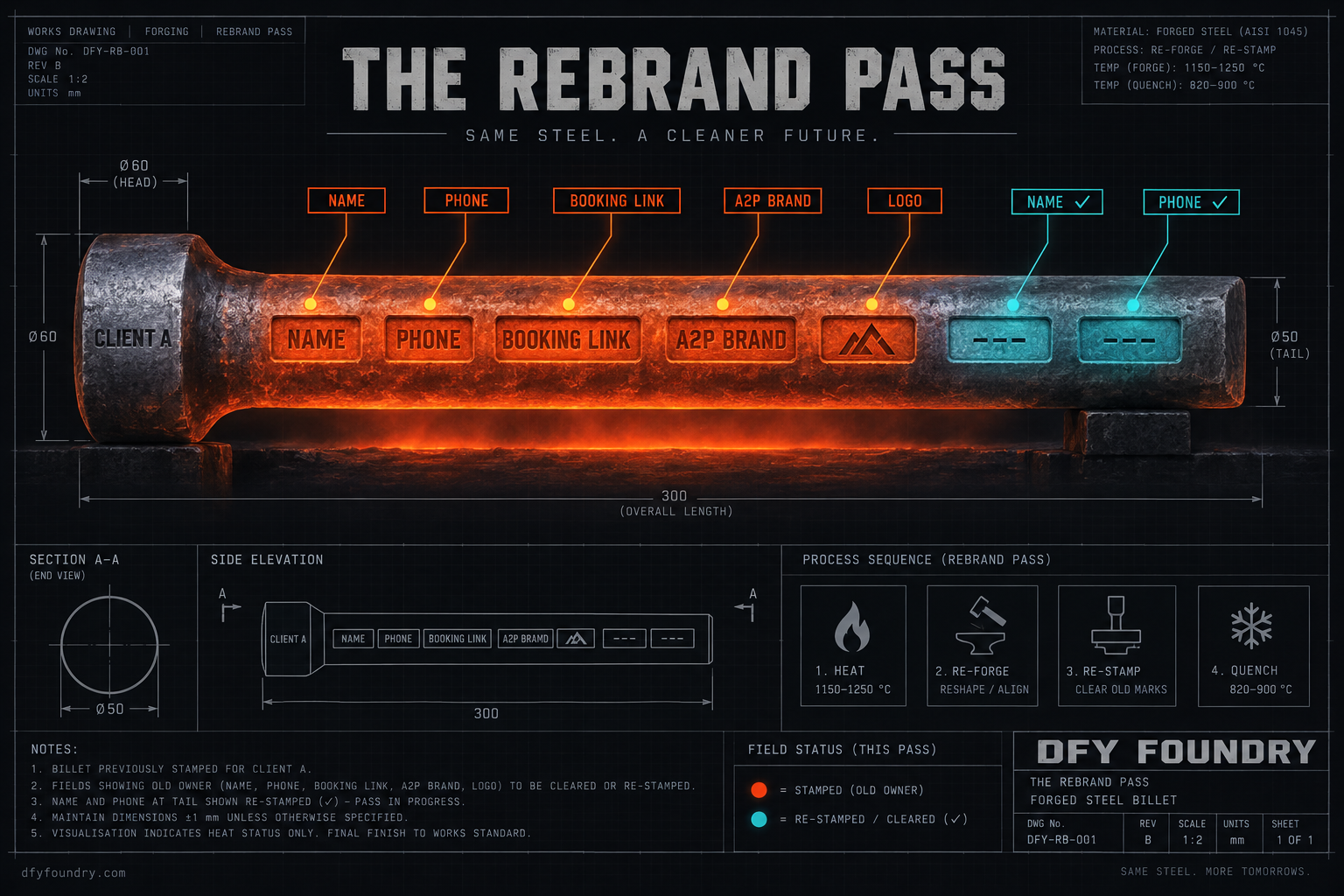
The build worked the first time. You poured a GoHighLevel account for an HVAC company on one side of town, it booked jobs, it chased no-shows, the client renewed. So when a second HVAC company signed, the one across town, you did the sensible thing. You did not build it again. You took the billet that already ran and reused it, loaded it clean into the new sub-account, and it looked right on every screen you checked. You handed it over Friday afternoon.
Monday the new client forwards you a screenshot. A lead of theirs booked a call over the weekend and got a confirmation text, and the text is signed with the first company’s name. Below it, the lead tapped the button to pick a time, and the screenshot of that page shows the first company’s booking calendar, the first company’s logo in the header. Two HVAC companies, same town, same trade. The client’s question is short. Why is my lead looking at my competitor’s business inside the account I am paying you for.
Nothing errored. Every workflow fired, the text sent, the page loaded. The build did exactly what it was built to do for the first client, because that is whose details were still living inside it, in the places a clean load never touches and a quick look never catches.
A reused build arrives empty of data and full of the last client
Start with the thing that fools people, because it is half true. A snapshot does not carry the last client’s data. Load one into a fresh sub-account and you get no contacts, no conversation history, no notes, no tasks, no phone number, no connected calendar, no payment integration, no authenticated sending domain, no A2P registration. HighLevel captures structure, not the account’s live connections, which is the same reason a fresh install never arrives able to send (HighLevel, Creating New Snapshots). On the data layer, a reused build genuinely does start clean. That is the half people hold onto, and it is why they skip the pass.
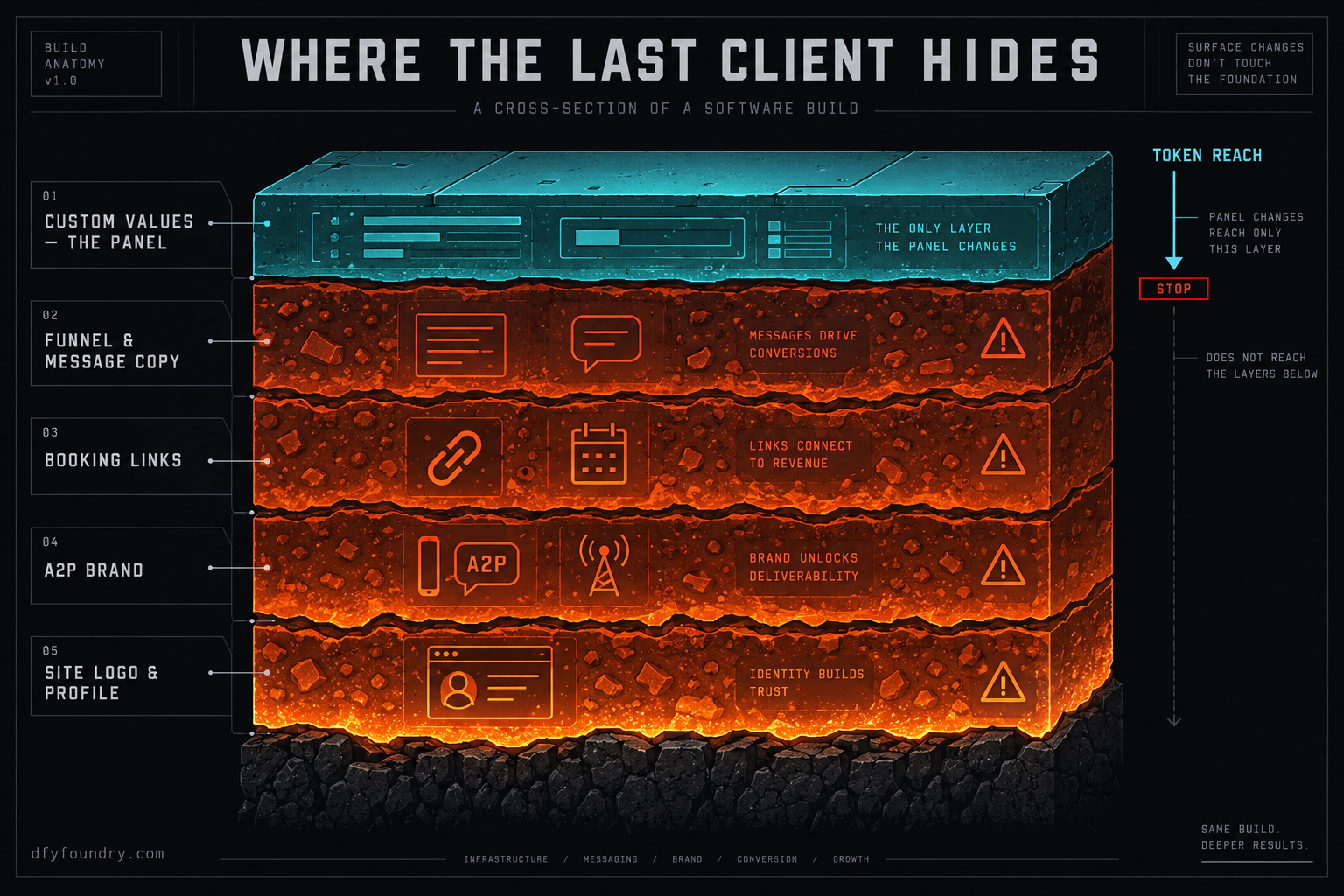
The other half is where the trouble lives. Everything you authored into the build to make it work for the first client comes across intact, because that is the part a snapshot is built to carry. The first client’s business name, phone number, address and booking link, if they are sitting in custom values, arrive in the custom values. The same details, wherever you typed them straight into a funnel page or an email or an SMS, arrive typed in. The names you gave the funnels, the pipelines and the calendars, the ones that describe the first client’s offer, arrive as those names. The logo you uploaded into the website arrives in the website. None of that is data in the sense the snapshot skips. All of it is structure, and structure is exactly what reused.
Custom values are the panel, and the panel is the easy part
Custom values are account-level key and value pairs you create once and reuse everywhere, so a message or a page reads the business name or the booking link from one place instead of a hundred (HighLevel, Custom Values Settings). A build made well leans on them hard. The business name, the phone, the address, the support email, the booking link, the office hours, all of it stored once under Settings then Custom Values, and every merge token across the account pulls from there (HighLevel, How to use Custom Values).
That is the good news for a rebrand. When the details live in custom values, repointing them at the new client is one screen. You open the custom values list, you change the business name, the phone, the address and the booking link to the new client’s, you save, and every token that read from them now reads the new client. One edit, propagated. If every detail in the build came through custom values, the rebrand would be that screen and nothing else.
Builds are rarely that clean, and that is the whole reason the pass exists.
Hardcoded copy is the part that keeps the last client alive
Somewhere in the build, the first client’s name is not a token. It is typed into the subject line of an email. It is written into the body of a confirmation SMS, because whoever wrote it wanted it to read naturally and a raw token looked clumsy. It is baked into a funnel page as plain text in a headline, and into the footer of the website next to an address. It is the alt text on a logo. None of those read from custom values, so changing the custom value does nothing to them. They each have to be found and changed where they sit.
This is the split that decides a rebrand. The custom values are the panel you can turn in one move. The hardcoded copy is the hunt, and the hunt is where a trace survives, because you cannot see it from the custom values screen and it does not announce itself. A build looks fully rebranded the moment the panel is changed. It is not. It is rebranded everywhere a token reads from the panel, and still the old client everywhere a human typed the name by hand.
The pass, in the order that catches the most
A rebrand runs cleanest in a fixed order, panel first so the tokens are right before you read the pages that contain them, then outward through the surfaces a token cannot reach, then the account’s own identity, then the send layer that is not structure at all.
First, custom values. Repoint the business name, phone, address, booking link, email and hours at the new client. Now every token across the build is correct, which means when you walk the pages next, anything still showing the old client is hardcoded by definition, and you have turned a vague hunt into a list of exceptions.
Second, the funnels, the website and the message copy. Open each funnel and page in the builder and read it as the new client’s lead would, looking for the old name, phone, address and booking link typed in rather than tokened. Do the same through every email and SMS in the workflows. Change the booking buttons and links so they point at the new client’s calendar, not the old one, because a booking URL copied into a page does not follow a custom value. Swap the logo and any image carrying the old brand.
Third, the account’s own identity. The sub-account’s business profile holds a friendly name and a legal name that the platform uses on its own surfaces and for compliance, and a snapshot does not set it to the new client, so it sits on whatever the account was created as (HighLevel, Business Profile settings). Set the name and the logo here too.
Fourth, the names. Rename the funnels, pipelines and calendars that describe the first client’s offer so the new client does not open their own account and read a competitor’s product in the labels. This is cosmetic until the client sees it, and then it is not.
Fifth, the send layer, which is not structure and never came across. Numbers, the A2P brand, the calendar connection and the sending domain are per-account connections the snapshot never carried, so they are not a trace to remove. They are a thing to build fresh for the new client, and the A2P brand in particular has to be registered under the new client’s own legal entity, in the account’s own trust center, not inherited from anyone (HighLevel, A2P Standard Brand Registration). The handover pass covers that connection layer end to end; the rebrand is what you do to the structure before you reach it.
Where the last client survives a careless rebrand
Each of these is a real place a trace lives through a rebrand that changed the panel and called it done. The pattern is the same every time: the account looks rebranded, so no one looks harder, and the new client finds the part you did not.
The confirmation text is signed with the old client’s name
What you see. The build is live. A lead books, and the confirmation SMS they receive is signed off with the previous client’s company name, or an email lands with the old name in the subject line. The workflow ran perfectly. It just said the wrong company.
What is wrong. The name in that message was typed into the message, not pulled from a custom value. When you repointed the custom values, this copy did not move, because it never read from them. The build looks rebranded on every screen that uses tokens and stays the old client on every screen a person wrote by hand.
The fix. After you change the custom values, open every email and SMS in every workflow and read the actual text, not the token list. Replace the typed name, phone and address with the new client’s, or better, replace them with the custom value tokens so the next rebrand is only the panel. Then fire a test contact through the real journey and read what actually sends, because the message as written and the message as sent are not always the same thing.
The booking button drops the lead onto the old client’s calendar
What you see. A lead taps “book a time” and lands on a scheduling page that belongs to the previous client, with their availability, their calendar, sometimes their name on the page. The new client’s leads are being handed to someone else’s calendar.
What is wrong. A calendar connection does not travel in a snapshot, but a booking link copied into a funnel page or a message as a plain URL does, and it still points at the old calendar. The custom value for the booking link may now be correct while a dozen buttons across the funnels still carry the old URL hardcoded. The token moved. The buttons did not.
The fix. Search the funnels, pages and messages for the booking link specifically, as a URL, not as a token, and repoint every instance at the new client’s calendar. Confirm the calendars themselves are renamed and owned by the new account. This is the single trace most likely to send a lead to a competitor, so it earns its own walk, and the test contact has to actually reach the booking page and see whose calendar loads.
Texts send under the old brand, or do not send at all
What you see. Either the new account’s texts go out and the registered brand behind them is the previous client’s business, or nothing sends at all and the workflow sits there with messages queued and never delivered.
What is wrong. A2P registration is per sub-account and tied to a legal entity, and a snapshot never carries it, so a reused build arrives with no brand of its own. If you cloned a whole sub-account rather than loading a clean snapshot, worse: the old client’s number and brand can still be attached, and the new client’s messages ride a registration that names a different company. Either way the send layer is not the new client’s until you make it so.
The fix. Register a fresh A2P brand and campaign in the new account’s own trust center, under the new client’s legal name and EIN, and provision the new account’s own number. Never reuse the previous client’s registration for a new business, because the brand has to match the entity actually sending. Build this during the rebrand so the account can send the day it goes live, rather than discovering the gap when the first workflow fires into silence.
The site goes live with the old logo and address
What you see. The website looks finished and carries the previous client’s logo in the header, their address in the footer, sometimes their old domain written into a link or a piece of copy. The new client opens their own site and sees a competitor’s brand on it.
What is wrong. The logo is an uploaded image, not a token, so it sits in the site until it is replaced. The footer address and any domain written into copy are hardcoded for the same reason. The domain itself does not carry in a snapshot, but the old domain referenced in a link or a line of text does, and it still points at the old client’s site.
The fix. Swap the logo and any brand image in the website and the funnels. Rewrite the footer address and contact block to the new client. Search specifically for the old domain as text and repoint or remove each instance. Then load the site as a visitor and read it top to bottom, because the header and footer are exactly the furniture a quick internal check scrolls past.
The account labels still describe the old client’s offer
What you see. The new client opens their account and the funnels, pipelines and calendars are named for the previous client’s service, their package names, their pricing tiers. Nothing is broken. It just reads as someone else’s business from the inside.
What is wrong. Names are structure, so they came across exactly as you set them for the first client. They are invisible from the front end, which is why they survive a rebrand that only checked what a lead sees, and they are fully visible to the client who logs in to the account they are paying for.
The fix. Rename every funnel, pipeline, pipeline stage and calendar that carries the old client’s wording. Keep your own internal naming convention if you use one, but strip anything that names the previous client’s offer. This is the cheapest trace to fix and the one that quietly tells a client the account was secondhand.
What the pass costs, and what a trace costs
The pass is not free in time, and the point of pricing it is to set that time against what a trace costs when a client finds it first. Do the arithmetic with your own figures, because the only hard numbers here are the ones we publish; the rest are assumptions you should replace with yours.
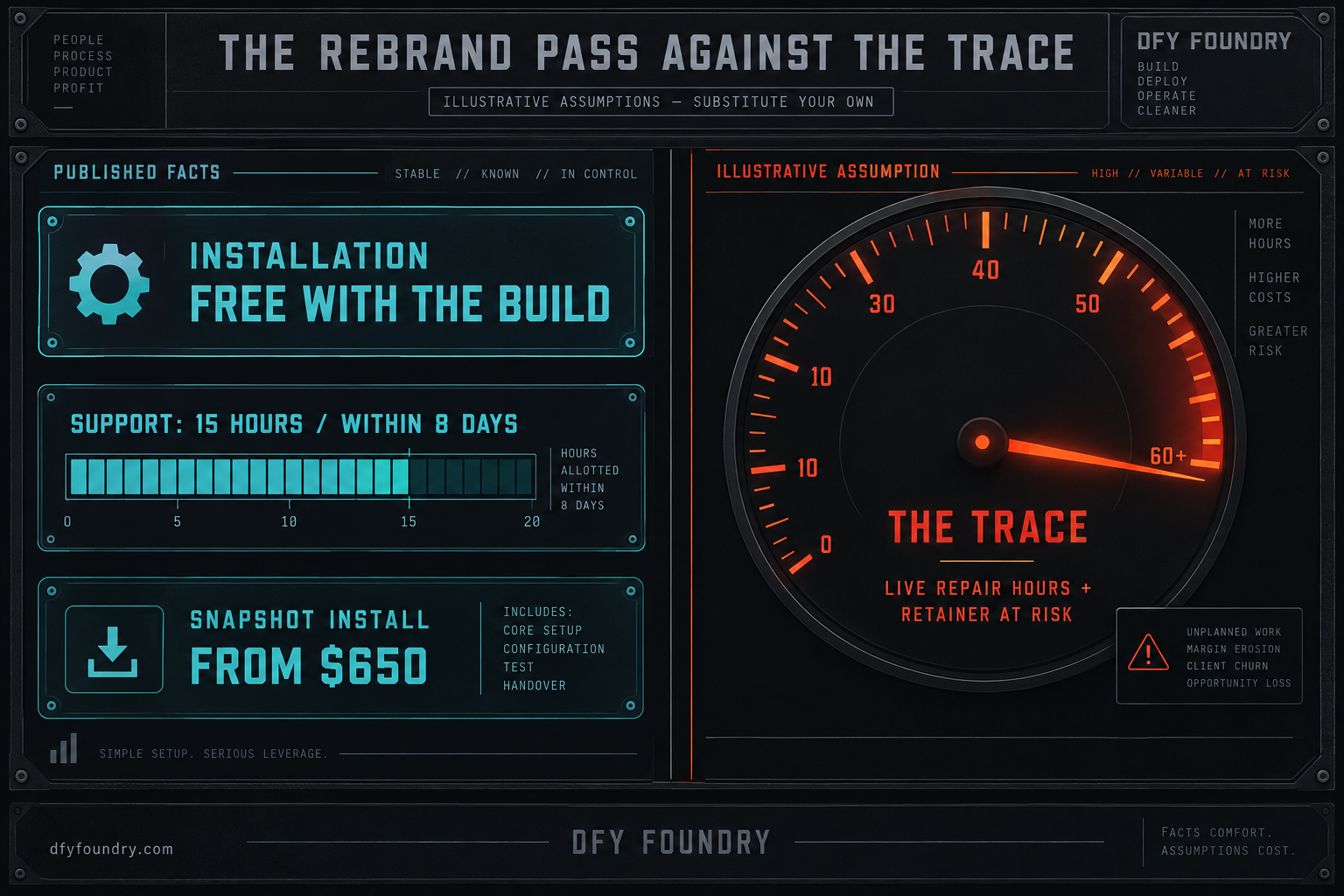
Take the published side first. On a build off our floor, rebranding the website with the new client’s name, colours, logo, domain and booking links is inside the free installation that comes with the build, done on the QA pass before the account goes live, and it comes with 15 hours of dedicated installation support to be used within 8 days of purchase (pricing). If instead you own a build already and want us to rebrand and install it into a new sub-account, that is the snapshot installation service, which runs from $650 and includes the step where every reference that points at the old account gets repointed at the new one. Those two numbers are real and you can read them on the pages.
Now the side with no published number, which is what a missed trace costs, and here every figure is a labelled assumption. Say you rebrand a build yourself, change the panel, and ship it with the booking link still hardcoded on several of the funnel pages. The new client finds it when a lead does, which is to say in front of a customer, in the worst possible room. Put your own hours on the repair: you cannot take a live account down to fix it, so you are editing under load while the client watches, and the embarrassing traces are rarely one. Put your own blended rate on those hours. Then put a number on the part that does not bill by the hour, the retainer a new client reconsiders in their first week because the first thing they saw was a competitor’s name inside their own account. That is the figure that dwarfs the others, and it is the one the pass is really buying down.
The method matters more than my numbers. Price the pass as the time to walk the panel, the copy, the names, the site and the send layer for one build. Price the trace as the live repair plus the odds on the retainer. The gap between them is almost always a few hours of reading against a client you spend a month earning back, and it holds whether the build is an HVAC company snapshot or a dental clinic snapshot going out to its second owner.
The objections, answered straight
“The snapshot does not carry contacts or numbers, so a reused build is already clean. Why run a pass at all?” Because the traces that embarrass you are not in the data layer the snapshot skips. They are in the structure it carries and that you authored for the first client: the name and booking link in custom values, the same details hardcoded into copy a token never reaches, the funnel and pipeline names, the logo in the site. A fresh load is clean of the old client’s leads and dirty with the old client’s identity, and it is the identity a new client reads. Clean data is necessary and it is not the pass.
“I will find-and-replace the business name and move on.” Find-and-replace is a good first move and a bad last one. It catches the name where it is typed into copy, which is real work done. It does not repoint a booking button aimed at the old calendar, it does not re-register the A2P brand under the new client’s legal entity, it does not swap the logo image or set the business profile name, and it does not know the difference between a token that is already correct and a hardcoded line that is not. The parts find-and-replace misses are precisely the parts a new client sees first, because they are the booking page, the sending brand and the logo, not the body text.
“If a rebrand is just a careful pass, why pay you for it? I can walk the screens myself.” You can, and if you buy the build and run your own accounts you should keep this pass and run it every time, because a build is only ever as clean as the rebrand behind it. What a build off our floor changes is the size of the hunt. We put the client-specific details into custom values from the start, so the panel is a real panel and the hardcoded exceptions are few, which turns a rebrand from a search into a short list. And on our builds the website rebrand, the name, logo, domain and booking links, is inside the free installation and done on our QA pass, so the repoint happens before the account goes live rather than after a lead finds the gap. If you would rather not own the pass at all, the snapshot installation service runs it for you on a build you already have. Either way the discipline is the same, and it is the same one behind the custom values that go blank on import: a build is finished when someone has read it as the new client, not when it loaded without an error.
Before the second owner logs in
A reused build is the best economics an agency has and the fastest way to hand a client their competitor’s business, and it is both for the same reason: a snapshot carries everything you authored into it, correct or not, into the next account without asking whose name is inside. The data stays behind. The identity comes with it, in the custom values you can turn in one move and the hardcoded copy, booking links, names, logo and unregistered send layer you cannot.
So make the rebrand a pass, not a swap. Change the custom values first so the tokens are right. Walk the copy, the booking links, the names and the site for everything a token cannot reach. Set the account’s own name and logo, and register a fresh A2P brand under the new client’s entity. Then send a test contact through the whole journey and read what it actually sees, the message that sends and the calendar that loads, before the client’s first lead does. Do that and a reused build is pure margin. Skip it and you find out which trace you missed on a Monday, from the client, with a screenshot. Never let the second owner be the first person to read the account as themselves.
Questions on this
Not the data layer. A snapshot does not carry contacts, conversation history, phone numbers, integrations, domains or A2P registration, so the new account starts clean on those. What it does carry is everything you authored into the build: the business name and booking link sitting in custom values, the same details hardcoded into funnel pages and message copy, the funnel and pipeline names, and the logo in the site. That is where the last client survives.
Change the custom values first, because one edit there repoints every merge token that reads from them. Then walk the funnel pages, email and SMS copy, calendars and the site for the same details typed in by hand, which no custom value can reach. Finish with the account's own business profile name and logo, and register a fresh A2P brand under the new client's legal entity. Fire a test contact through the whole journey before it goes live.
No. Find-and-replace catches the old business name where it is typed into copy, which is useful, but it does not repoint a booking link aimed at the old client's calendar, it does not re-register the A2P brand under a new legal entity, and it does not swap the logo image or the business profile name. A rebrand is a pass through named screens, not a single swap, and the parts it misses are the ones a new client notices first.
Rebranding the website with the new client's name, colours, logo, domain and booking links is inside the free installation that comes with every build, run on our QA pass. You also get 15 hours of dedicated installation support, to be used within 8 days of purchase. If you want us to rebrand and install a build you already own, snapshot installation runs from $650. Either way the repoint is done before the account goes live, not after a client finds a trace.